
A skipped browser module and a CLI input error are different
A video commenter reports a browser-converter warning that a bundled sce_module/libc.prx was skipped because it is a SELF container. The current upstream CLI usage document treats a bundled SELF module as an error, just as it treats a non-ELF executable input as an error.
Keep the converter’s name, version and complete message. Do not write a guide that assumes every tool silently skips the same file, or that continuing past a warning has produced a complete runnable conversion.
1. Identify the selected file’s header
Use the local ELF header checker to check whether the selected file has a plausible ELF64 x86-64 little-endian header. It reads only the first 64 bytes locally. A match does not inspect the complete payload, resolve imports or prove the title will run.
Check the main input and the bundled module named by the warning separately. A filename ending in .elf or .prx does not prove what the bytes contain. Renaming a file cannot convert a container.
2. Confirm which files belong to the game
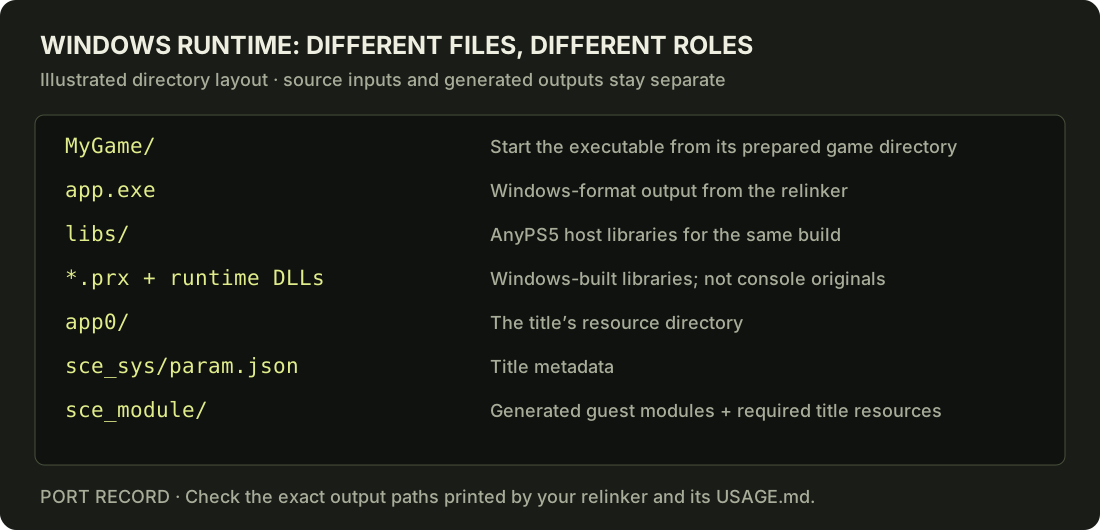
The reviewed CLI searches supported module directories beside the input or under the selected module-parent path. Check sce_module/, sce_modules/ or prx/ according to that revision. A missing directory, competing directories and a wrong file format are separate problems.
Host libs/ contains AnyPS5 libraries built for your operating system. It is not a place to copy original console system modules. On Windows, that mix-up can produce error 193.
3. Return to a documented clean-input workflow
Use only an input you are entitled to use and a preparation method documented for your actual files. Container extraction and decrypting encrypted content are different operations; identifying a readable header does not establish that an entire payload is unencrypted.
This page does not supply game files, firmware, keys or a universal extraction command. When the current tool requires a clean ELF, prepare that input before asking the relinker to convert it. Preserve the original files and select a separate output path.
4. Check what was actually converted
Review the converter output for each expected guest module, then compare the resulting runtime layout with its documentation. No skipped required module should be silently treated as a success. If conversion completes and startup fails later, diagnose that later stage separately.
Report the exact message, converter revision, selected input format, module directory names and first failure. Do not upload private game files in a help request. The illustrated Windows guide and command builder explain the next preparation steps without predicting compatibility.
Sources
Prepare your next step.
Use the local tools alongside the upstream documentation.